Before
A customer, vehicle and requested service enter an appointment or walk-in visit.
 DriveOnyxDEALERSHIP OPERATIONSRequest a demo
SERVICE OPERATIONS
Explore a service workspace that brings appointment, customer and vehicle context together. See how clearer records help your team prepare for the next handoff.
Product captures show selected sample-data workflows, rather than a complete repair-to-closure journey. Arrival condition checks and mechanical inspection serve different purposes.
WHAT THIS MEANS FOR YOUR TEAM
Start with the appointment, customer and vehicle details in view.
Follow a sample arrival and condition record into a visit.
Review responsibilities and the next action behind each handoff.
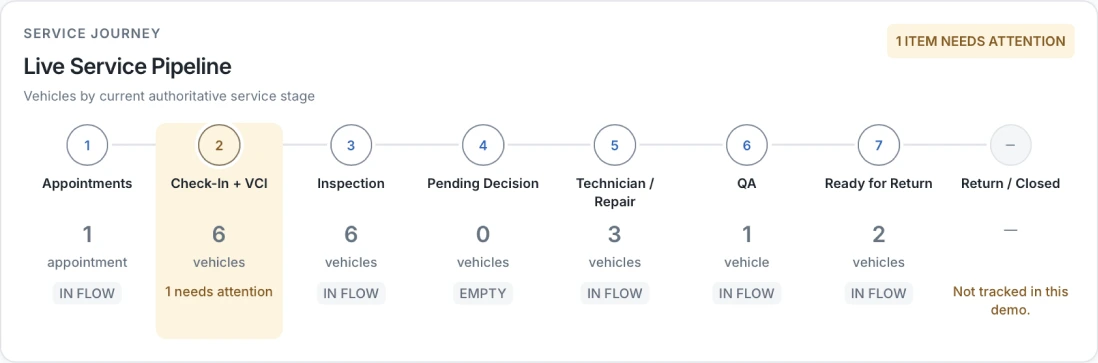
Static manager demo view showing service stages and an item needing attention. Return / Closed is not tracked in this capture.
BUILT AROUND THE WORK
Explore the connected tasks behind Service Operations and what they mean for your dealership.
Walk through a sample calendar, customer and vehicle details, and scheduled or walk-in check-in. Keep the context for the visit together from the start.
Review arrival condition information alongside a sample visit. Give the next team a clearer starting point for the vehicle that arrived.
Find a sample visit’s stage, open its details and review the checks behind handover. A stage label alone does not authorize vehicle release.
The product direction extends into mechanical inspection, versioned estimates, customer decisions, workshop execution, parts, quality checks and invoicing. These workflows are being developed beyond the selected walkthroughs.
IN THE WIDER WORKFLOW
A customer, vehicle and requested service enter an appointment or walk-in visit.
The dealership reviews the visit context and authorizes the next work or release step.
SEE THE FIT FOR YOUR DEALERSHIP