Service Advisers
Know the visit before the next conversation.
Explore appointment, vehicle and arrival-condition context before the next handoff.
 DriveOnyxDEALERSHIP OPERATIONSRequest a demo
DEALERSHIP SERVICE OPERATIONS SOFTWARE
Explore appointments, vehicle check-in and adviser responsibilities in a guided DriveOnyx demonstration. See the sample workflows and discuss your dealership’s needs.
Service operations · Staff management · Analytics
THE SERVICE JOURNEY
Explore the service journey—from appointment and arrival to inspection, repair and vehicle return.
Appointment, customer and vehicle context.
Explore this stageVehicle condition, inspection findings and approval requirements.
Explore this stageApproved work, parts readiness and quality requirements.
Explore this stageReadiness, handoff and transport requirements.
Explore this stageSERVICE. PEOPLE. CUSTOMER CONNECTIONS.
Find the right DriveOnyx solution for service coordination, team responsibilities and customer relationships.
Prepare for the visit with its context and responsible adviser in view.
Review the customer, vehicle, and upcoming visit.
Explore check-in and recorded vehicle condition.
See the assigned adviser alongside the visit.
Understand the service day.
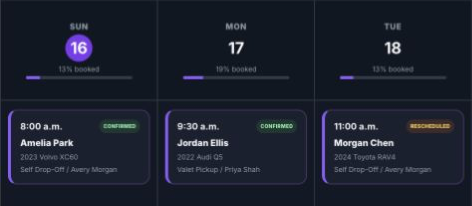
Selected earlier sample calendar, rather than a live scheduling view.
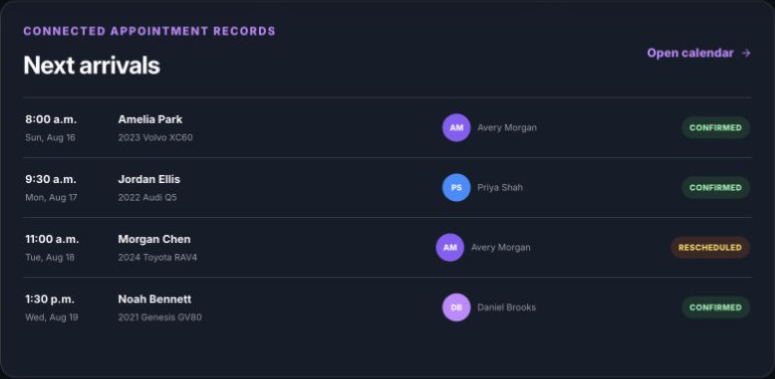
See who is expected, which vehicle is arriving and the appointment’s recorded status. Sample records are used.
Explore appointments and calendar →Separate sample-data examples, rather than one continuous vehicle transaction. Wider inspection, repair and invoicing workflows are being developed; explore their context on the solution page.
Explore Service OperationsSee the adviser responsible for a visit and the capacity context behind the day.
Identify the adviser assigned to an upcoming sample appointment. Bring the person responsible into view alongside the customer, vehicle and visit.
Compare sample booked time, available service time and team-pool constraints. Use the wider operating picture to guide the next capacity conversation.
The wider product direction connects task responsibilities, operational measures and dealership-location boundaries. Explore the ownership and reporting views your leadership needs as this work develops.
Sample views illustrate adviser ownership and service capacity; they do not represent technician allocation or person-specific open appointment slots.
Explore Staff & Work ManagementBring stock-vehicle preparation and handoff checks into clearer focus.
Explore sample new, used and demo vehicle records, together with internal service requests. Bring vehicle identity and preparation context into the department handoff.
Follow a sample PDI and review the inspection record behind it. Keep the required checks connected to the vehicle being prepared.
Review sample preparation blockers and handover details. The responsible team considers quality checks and release authority alongside the inspection result.
These are sample product walkthroughs. A completed PDI is one part of preparation and does not authorize delivery or release on its own.
Explore Inventory ReadinessA dealership-managed pickup and return experience, designed around the service visit.
See independent arrival and return choices in a sample appointment. Selecting pickup or return records the requested option; it does not dispatch a driver.
The valet direction connects inbound collection and outbound return with driver tasks, condition records and release checks. Trip execution and connected handoffs are being developed.
The concept separates the Driver App’s trip tasks from customer choices and updates. The dealership remains responsible for dispatch and vehicle release.
The illustration represents the valet concept, not a live tracking or delivered customer-update service. Drivers, vehicles and insurance remain the dealership’s responsibility.
Explore Valet Pickup & ReturnExplore how Onyx Referrals links a customer introduction to dealership follow-up, a verified qualifying sale and eligible benefits for both people.
The walkthrough uses sample data and the artwork is illustrative. Viewing this website does not activate a live campaign or connected service-credit redemption.
Explore Onyx ReferralsA Customer App preview centred on appointment requests, service updates and valet options.
The preview covers customer access, vehicle details, requested work, the dealership and a preferred time. The dealership’s recorded response determines the booking outcome; a request or preferred time is not a confirmed reservation.
Explore recorded service stages, proposed appointment changes and estimate approval or rejection. This customer journey concerns service records and decisions, rather than live vehicle location.
Explore pickup-address and transport choices attached to a service request. Customer choices remain separate from Driver App tasks, confirmed dispatch and trip execution.
The intended customer journey extends into invoice presentation and connected payment. The preview does not represent an active payment service or a completed transaction.
This is a product preview, not a downloadable app release or a verified connected customer transaction. Recorded progress is service status, not live GPS; a valet request is not confirmed dispatch.
Explore Customer ExperienceA concierge vision for useful service guidance and a clear route to your team.
The concierge vision centres on service questions and dealership-approved information. The aim is to help customers understand their next step and find the right person for help.
Future assistance could draw on permitted visit information to make guidance more relevant. Customer identity, record access and approved information remain central to that vision.
The vision keeps booking, estimates, repairs, driver dispatch and vehicle release under dealership authority. Questions beyond the guidance boundary belong with a person; the assistance method is part of this future direction.
Mr-Onyx is a concierge vision, not a released chat or AI service. Separate rule-based Onyx Assist uses deterministic checks and template summaries; it does not establish conversational Mr-Onyx AI.
Explore Mr-Onyx ConciergeBUILT AROUND YOUR TEAM
Service Advisers
Explore appointment, vehicle and arrival-condition context before the next handoff.
Service Managers
Explore visit status and sample capacity views to focus the next team conversation.
Dealership Leadership
Explore how service coordination, team responsibilities and referrals fit your dealership.
Bring the handoffs, decisions and bottlenecks that matter to your team. We’ll walk through relevant workflows and discuss how DriveOnyx fits your dealership.
How to evaluate DriveOnyx →Selected service visits, adviser assignments and capacity context, plus the Onyx Referrals workflow. Product previews use sample records; each solution explains the experience and its wider product direction.
Bring your current systems and integration requirements. Supported connections, data sources and responsibilities must be confirmed for your dealership; no universal DMS integration is promised.
A verified qualifying sale and administrator approval can unlock eligible benefits for both people, including service credits. Live campaign rollout and Service Portal integration are planned.
YOUR DEALERSHIP. YOUR DEMONSTRATION.
Tell us whether your priority is service coordination, customer experience or referrals. We’ll discuss the relevant product examples, your existing systems and the next steps for your team.
Tell us who to contact for a DriveOnyx dealership demo.
Or email contact@driveonyxsolutions.com