
Skip to content
DriveOnyxDEALERSHIP OPERATIONSRequest a demo

Home / Platform

DRIVEONYX PLATFORM

See the whole picture.
Find your next step.

Explore service visits, dealership teams and customer connections. Find the workflows that fit the way your dealership works.

Request a demo

The right workflow for your team.

Seven solution families. Start with the work that matters to your dealership and explore the experience behind it.

01

Service Operations

Bring appointments, arrival context and visit visibility into one dealership workspace.

Product captures show selected sample-data workflows, rather than a complete repair-to-closure journey. Arrival condition checks and mechanical inspection serve different purposes.

Appointments & arrival
Walk through a sample calendar, customer and vehicle details, and scheduled or walk-in check-in. Keep the context for the visit together from the start.
Vehicle condition
Review arrival condition information alongside a sample visit. Give the next team a clearer starting point for the vehicle that arrived.
Visit visibility & handoff
Find a sample visit’s stage, open its details and review the checks behind handover. A stage label alone does not authorize vehicle release.
The wider service journey
The product direction extends into mechanical inspection, versioned estimates, customer decisions, workshop execution, parts, quality checks and invoicing. These workflows are being developed beyond the selected walkthroughs.
02

Staff & Work Management

See the adviser responsible for a visit and the capacity context behind the day.

Sample views illustrate adviser ownership and service capacity; they do not represent technician allocation or person-specific open appointment slots.

Adviser responsibility
Identify the adviser assigned to an upcoming sample appointment. Bring the person responsible into view alongside the customer, vehicle and visit.
Capacity in context
Compare sample booked time, available service time and team-pool constraints. Use the wider operating picture to guide the next capacity conversation.
Work ownership & department insight
The wider product direction connects task responsibilities, operational measures and dealership-location boundaries. Explore the ownership and reporting views your leadership needs as this work develops.
03

Inventory Readiness

Bring stock-vehicle preparation and handoff checks into clearer focus.

These are sample product walkthroughs. A completed PDI is one part of preparation and does not authorize delivery or release on its own.

Stock context & internal intake
Explore sample new, used and demo vehicle records, together with internal service requests. Bring vehicle identity and preparation context into the department handoff.
Pre-delivery inspection
Follow a sample PDI and review the inspection record behind it. Keep the required checks connected to the vehicle being prepared.
Readiness & release checks
Review sample preparation blockers and handover details. The responsible team considers quality checks and release authority alongside the inspection result.
04

Valet Pickup & Return

A dealership-managed pickup and return experience, designed around the service visit.

The illustration represents the valet concept, not a live tracking or delivered customer-update service. Drivers, vehicles and insurance remain the dealership’s responsibility.

Arrival & return choices
See independent arrival and return choices in a sample appointment. Selecting pickup or return records the requested option; it does not dispatch a driver.
Trip coordination & handoffs
The valet direction connects inbound collection and outbound return with driver tasks, condition records and release checks. Trip execution and connected handoffs are being developed.
Distinct driver & customer touchpoints
The concept separates the Driver App’s trip tasks from customer choices and updates. The dealership remains responsible for dispatch and vehicle release.
05

Onyx Referrals

Explore how Onyx Referrals links a customer introduction to dealership follow-up, a verified qualifying sale and eligible benefits for both people.

The walkthrough uses sample data and the artwork is illustrative. Viewing this website does not activate a live campaign or connected service-credit redemption.

Refer: an offer worth sharing
Walk through customer enrolment, offer sharing and an accepted referral in a sample demonstration. Connect the referred buyer to the customer who introduced them and the sales team responsible for follow-up.
Verify & reward: benefits with clear rules
Follow the qualifying-sale check and administrator approval that precede benefits for both people. Eligible service credits follow the offer’s conditions; purchases do not automatically earn points.
A reason to return for service
Explore the direction for service-credit use and its connection to dealership service operations. The connected redemption and Service Portal journey is being developed beyond the sample referral demonstration.
06

Customer Experience

A Customer App preview centred on appointment requests, service updates and valet options.

This is a product preview, not a downloadable app release or a verified connected customer transaction. Recorded progress is service status, not live GPS; a valet request is not confirmed dispatch.

Your vehicle. Your service request.
The preview covers customer access, vehicle details, requested work, the dealership and a preferred time. The dealership’s recorded response determines the booking outcome; a request or preferred time is not a confirmed reservation.
Service progress & customer decisions
Explore recorded service stages, proposed appointment changes and estimate approval or rejection. This customer journey concerns service records and decisions, rather than live vehicle location.
Valet choices within the visit
Explore pickup-address and transport choices attached to a service request. Customer choices remain separate from Driver App tasks, confirmed dispatch and trip execution.
The payment journey ahead
The intended customer journey extends into invoice presentation and connected payment. The preview does not represent an active payment service or a completed transaction.
07

Mr-Onyx Concierge

A concierge vision for useful service guidance and a clear route to your team.

Mr-Onyx is a concierge vision, not a released chat or AI service. Separate rule-based Onyx Assist uses deterministic checks and template summaries; it does not establish conversational Mr-Onyx AI.

Guidance around the service journey
The concierge vision centres on service questions and dealership-approved information. The aim is to help customers understand their next step and find the right person for help.
Relevant context. Appropriate access.
Future assistance could draw on permitted visit information to make guidance more relevant. Customer identity, record access and approved information remain central to that vision.
A clear handoff to your team
The vision keeps booking, estimates, repairs, driver dispatch and vehicle release under dealership authority. Questions beyond the guidance boundary belong with a person; the assistance method is part of this future direction.

PLAN WITH YOUR TEAM

The demonstration
starts with your needs.

Show us the handoffs you want to improve and the systems you rely on. Walk through the relevant product examples with the people who know your service day.

Request a demo →
DriveOnyx / OperationsDemo view
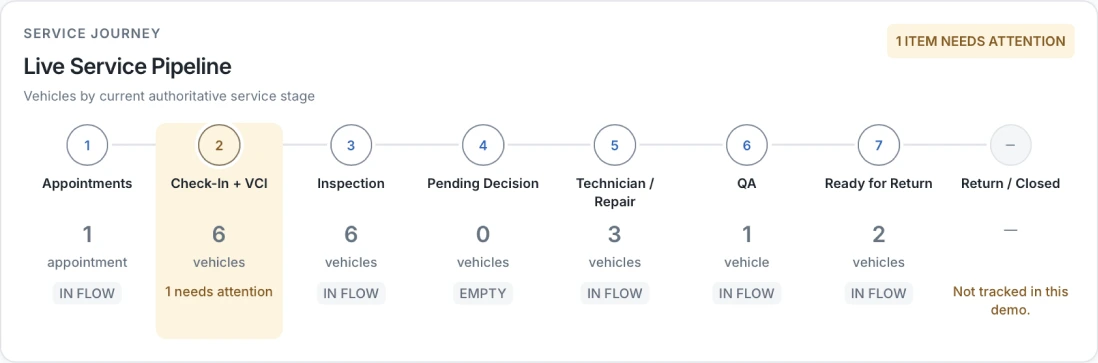
Actual redacted DriveOnyx Manager Operations service-pipeline preview, including its untracked Return and Closed limitation
Product preview · sample dataView full capture (opens in a new tab)

Static manager demo view showing service stages and an item needing attention. Return / Closed is not tracked in this capture.